Working with an AI agent
konoma was built for one layout: konoma on the left, an AI coding agent (Claude Code, etc.) on the right. The agent edits; you watch, review, and steer — without ever leaving the keyboard.
Follow mode — F
Section titled “Follow mode — F”Press F anywhere. From now on, whenever a file changes on disk, konoma
automatically shows a diff of what changed since you pressed F
(hunk-level before/after, the same full-screen diff as the git suite) — any
changes the file already had before you started following stay hidden, so
what you see is exactly the agent’s new work. The agent saves a file → you’re
looking at exactly that edit, hands off.
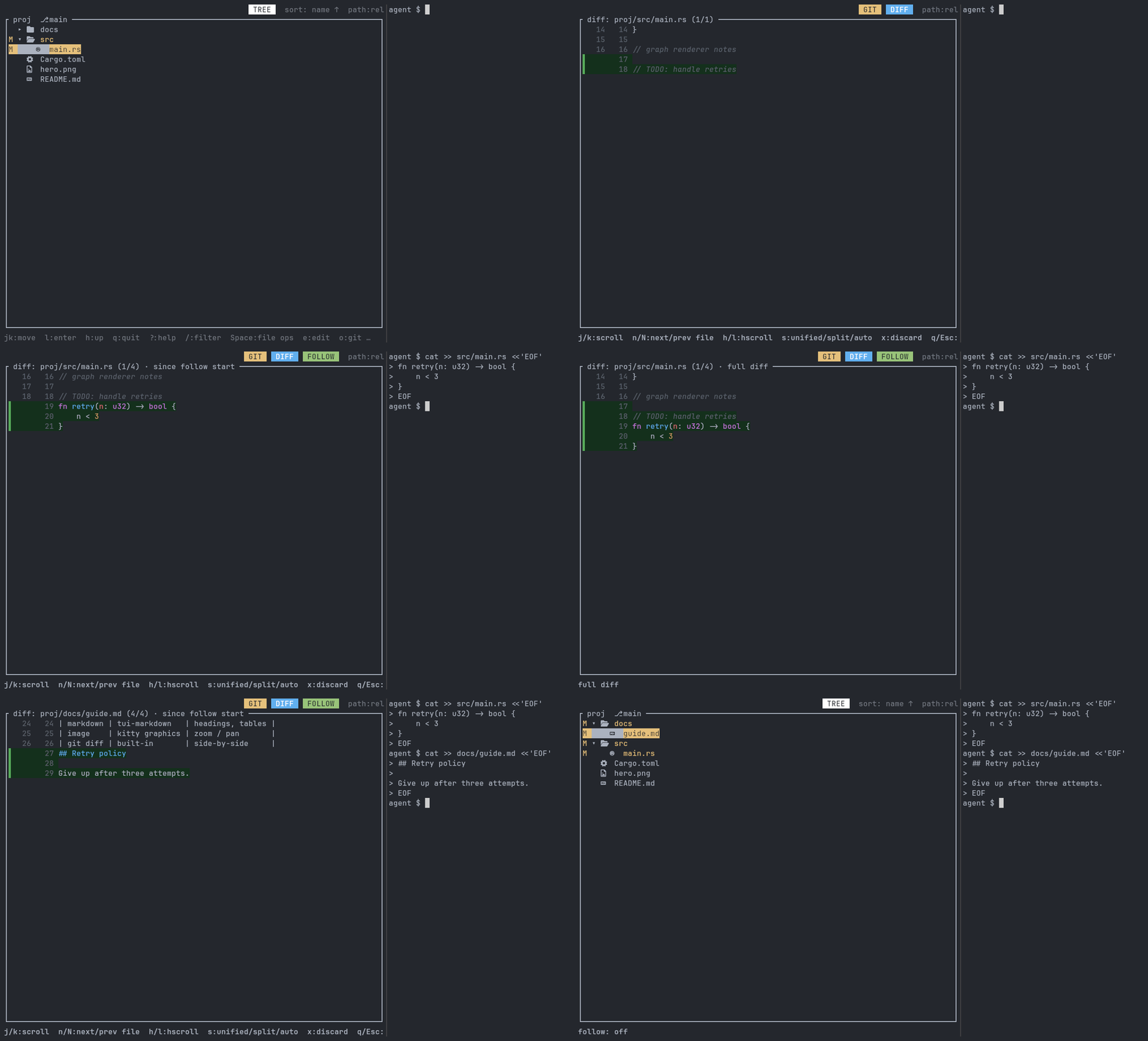
src/main.rs starts with an uncommitted line of your own (// TODO: handle retries) — the plain git diff shows it. After F, the agent appends a function
and konoma opens the file by itself, with that new function as the only
highlighted change: your earlier edit has dropped back to context. f switches
to the full git diff, where both changes are highlighted. The agent then edits
docs/guide.md and konoma follows again.
Details that make it comfortable:
- Follow is sticky. Reading the diff — scrolling,
n/N(cycling changed files),f(below) — doesn’t turn it off. Onlyq(leaving the diff), entering a text-input/confirm prompt, or pressingFagain stops following. - Press
finside a follow diff to switch between the diff since follow-start (default) and the full git diff for that file — the title shows which one you’re looking at (· since follow start/· full diff). - Untracked (new) files show as an all-added diff. Files with no diff and media files (images, PDFs, …) open as a normal preview instead, scrolled to the first change.
- Rapid multi-file edits are rate-limited to about one view-switch per second (the latest change wins), so bursts don’t thrash the screen.
- While a diff is on screen,
n/Ncycle through the files changed in this follow session — the title shows your position like(2/5). Files that were already dirty before you pressedFdon’t clutter the loop. .gitinternals, gitignored and hidden files are never followed.ui.follow_view = "file"switches the default presentation from diff to a normal preview with the git gutter, scrolled to the first changed hunk.
Changed-files view — C
Section titled “Changed-files view — C”C flattens the tree into just the files with uncommitted changes (relative
paths, live-updating, status markers). Review an agent’s work top-to-bottom:
Enterpreviews,dshows the diff.n/Nalso work from the normal tree — they jump to the next/previous changed file, expanding collapsed directories as needed.Corhreturns to the normal tree. The view exits by itself when the change set becomes empty (e.g. after a commit).
Point the agent at things — @ references
Section titled “Point the agent at things — @ references”Coding agents accept @path references. konoma copies them ready-to-paste:
- Tree:
y→@copies@relative/pathfor the selected entry. - Text preview:
Ycopies@path#L12for the caret line, or@path#L12-34for av/Vselection.
Paste into the conversation and the agent knows exactly which lines you mean.
Worktrees — one checkout per agent — o w
Section titled “Worktrees — one checkout per agent — o w”Agents work best with a checkout of their own, which is why git worktree has
become the usual way to run several at once. konoma lists them: o then w.
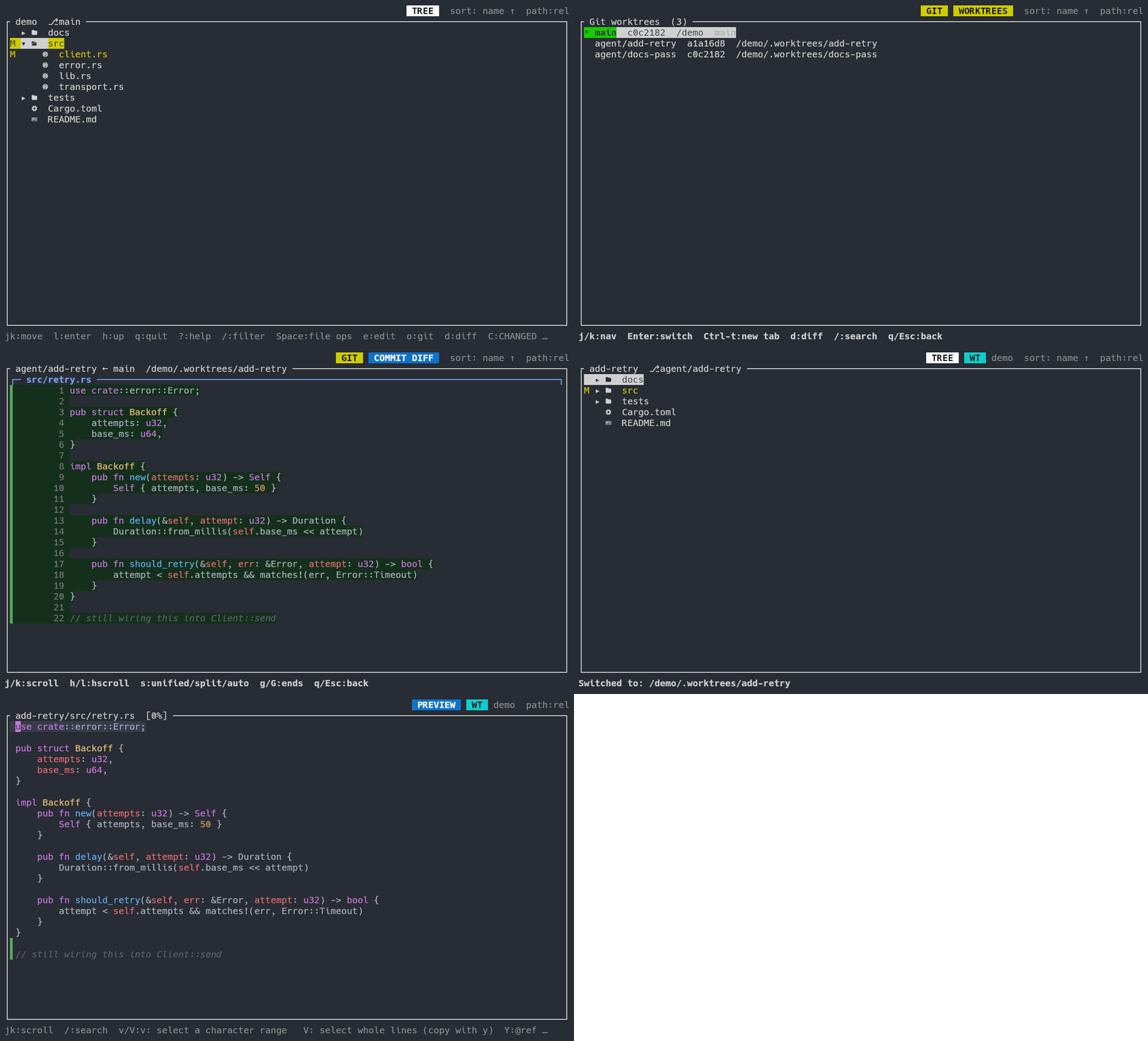
Your own checkout has an uncommitted edit of your own. o w lists the
worktrees; the agent has one to itself. d shows what that worktree added since
its base branch — the commit it landed and the line it is still writing. After
Enter you are inside it, and WT demo names the repository add-retry belongs
to.
dspans committed and uncommitted work. An agent usually commits as it goes, so a diff of uncommitted changes alone would go blank exactly when it got something done. konoma diffs from the merge base instead, and includes untracked files, so a new file the agent just wrote is visible too.- The base branch is the nearest one. Among the branches in
graph_base_branchesand the one checked out in the main worktree, konoma picks whichever shares the most recent common ancestor — the branch the worktree actually grew out of, so unrelated work on other branches stays out of the diff. Entermoves this tab,Ctrl-topens another. Switching also re-bases@references on the worktree you are now in, so what you paste into the chat points at the right file.- The
WTchip is always there. A worktree’s directory is named after the branch, not the project, so nothing on screen would otherwise say which repository you are in. In an ordinary checkout no chip appears. - Worktrees git will not let you enter — a bare repository, or one whose directory has been deleted — say so instead of failing quietly. A locked one can still be entered: the lock guards moving and deleting it, not reading it.
A typical loop
Section titled “A typical loop”F— follow on. Ask the agent for a change.- Watch the diffs land as the agent works;
n/Nto flip between files. - Spot something off?
Ythe exact lines, paste the@path#L12-34reference into the chat with your comment. - Happy?
o→ stage →ccommit, all inside konoma.